
A face scan can show visible ageing signs in minutes, but it cannot diagnose skin disease. I’d use it for three things: get a baseline, spot the main cosmetic issues, and take better notes into a clinic visit.
In simple terms, this type of AI looks at a clear face photo and scores what it can see – mainly lines, colour changes, pores, texture, puffiness, and lower-face shape. Many tools use a 0–100 score, and some give an apparent skin age based on how your photo compares with people in a similar group. That can help if I want a more fixed way to track change than just looking in the mirror.
Before I trust the result, I’d keep the photo setup tight:
- Use indirect daylight
- Keep the camera at eye level
- Use a neutral expression
- Remove make-up, SPF, and glasses
- Turn off beauty filters
- Take repeat photos in the same place and light
- Label images clearly, such as 19-09-2026
A few points matter most:
- Wrinkles: forehead lines, crow’s feet, under-eye lines, nasolabial folds, marionette lines
- Colour: brown spots, patchy tone, redness
- Texture: pores, roughness, dry-looking surface
- Limits: it does not check for skin cancer, moles, or skin conditions in a medical sense
- Next step: use the report to guide a talk with a clinician, not to self-diagnose
If I were checking my skin at home, I’d repeat the scan about every 30 days. For clinic follow-up, I’d expect reviews about every 3 to 6 months. Used that way, AI skin scoring is less about guessing and more about keeping a steady record of what my skin looks like over time.
This article breaks down what those scores mean, how to get a clean photo, and how to use the result in a treatment discussion with Eternaface.
How AI reads ageing signs from facial images
When you upload a facial photo, AI uses computer vision to find your face and map key landmarks such as the eyes, nose, mouth, jawline and forehead. That creates a fixed reference frame, so each scan is measured against the same spatial map. In plain English, the system is using the same layout each time, which helps it judge changes area by area instead of making a rough guess.
Facial zones and skin markers
After the face is mapped, the system splits the image into specific anatomical regions, including the forehead, under-eyes and crow’s feet area, cheeks, nose and T-zone, and the lower face, such as nasolabial folds, marionette lines and jawline. Each zone is then scored for the signs that tend to show up most clearly there.
Inside those zones, AI checks for line density and depth across the forehead and around the eyes, melanin changes that appear as dark spots or uneven tone, and pore visibility and surface roughness across the T-zone. It also reads shadows and contours to assess jawline definition, cheek volume and mild sagging. Think of it as a face-by-face scan of texture, tone and shape.
Key markers include nasolabial folds, under-eye lines, enlarged cheek pores, forehead lines, under-eye puffiness, uneven skin tone and marionette lines, with forehead and marionette lines showing the largest visible shift across decades.
Apparent skin age and combined scoring
The system then combines those zone scores into an overall apparent skin age on a 0–100 scale, where a higher number means fewer visible ageing signs. That estimate is based on how those visible markers compare with matched peer data.
Apparent skin age is a cosmetic score, not a medical measure. Its main use is as a baseline for tracking visible ageing over time, whether you’re seeing how your skin reacts to a new routine or getting ready for a clinical consultation. Those zone-level scores then feed into the wrinkle, tone and texture markers covered next.
sbb-itb-4219cc3
The main ageing markers AI can measure
These scores usually sit in three groups: wrinkles, colour, and texture.
Wrinkle patterns and line severity
AI can score key wrinkle types by facial area, including forehead lines, frown lines, crow’s feet, under-eye lines and puffiness, nasolabial folds, and marionette lines.
Some lines change more than others with age. In photo-based scoring, forehead lines and marionette lines show the biggest shifts in severity with each decade of life.
Pigmentation, redness and uneven tone
Patchy pigmentation, sun-related dark spots, and redness can all affect how old skin looks in an image-based check. AI reads colour changes across different parts of the face and splits them into two separate signals:
- Uneven melanin distribution, which can appear as brown spots or patchy colour
- Redness patterns, which are scored on their own because they may point to different causes, such as broken capillaries, irritation, or rosacea
Uneven pigmentation is often one of the clearest signs of cumulative sun damage and skin ageing.
Texture, pores and surface roughness
AI also looks at the skin’s surface, not just its colour. It checks for small shifts in pattern and smoothness across the image, picking up fine surface texture or rougher, drier-looking skin linked with ageing and dehydration.
Visible cheek pores are a strong age marker. They tend to change more slowly than wrinkles, but they still carry a high weight in age-prediction models. In most cases, texture findings in a report reflect cosmetic ageing, not a medical diagnosis. That makes them a useful starting point for a treatment discussion.
Clear photos make these scores more reliable.
How to prepare for a clear AI skin review at home
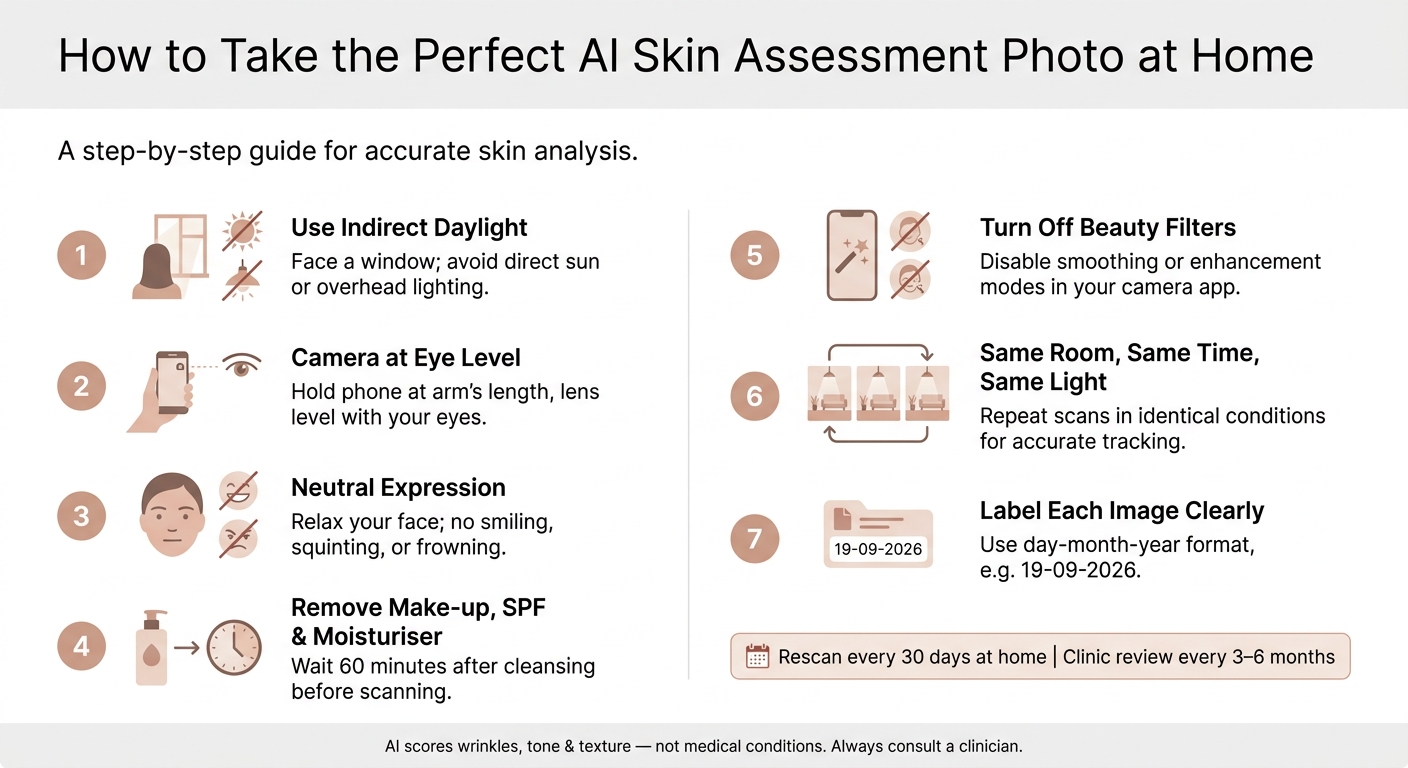
How to Take the Perfect AI Skin Assessment Photo at Home
Use a clean, well-lit photo, because AI can only score what it can clearly see. That means the first job is simple: give the system an image it can read without guessing.
Lighting, camera position and expression
Stand facing a window and use indirect daylight, not direct sun or overhead light, which can warp shadows and make wrinkles look deeper or flatter than they are. For users in the West of England and South Wales, a north-facing window usually gives the steadiest indirect daylight.
Hold your phone or camera at arm’s length, with the lens at eye level. Frame your full face from forehead to chin, look straight ahead, and keep your expression neutral and relaxed. Small changes in angle can throw things off. Tilt your head up, and jowls may look more obvious. Tilt it down, and forehead lines may be less visible.
Turn off any beauty mode, smoothing, or enhancement setting in your camera app. Those features soften the very details the AI needs to assess, such as wrinkles and pores. Clear light and bare skin also help the system read wrinkles, pigmentation, and texture with more accuracy.
If you want to compare scans over time, keep things as similar as possible. Use the same room, the same time of day, and the same lighting for each photo. Label each image in day-month-year format, for example 19-09-2026.
Once the framing is right, the next step is getting your skin ready.
Prepare clean skin before taking photos
Take the photo on bare skin. Remove make-up, SPF, and moisturiser, then wash and dry your face and wait at least 60 minutes. This gives any short-term redness or cleansing shine time to settle. Wet skin can also cause bright reflections that the AI may read the wrong way.
A quick checklist helps:
- Tie your hair fully back so it’s away from your face.
- Remove glasses and any large jewellery that could block the hairline or temples.
- Check the camera lens for smudges, because they can blur fine texture.
Check privacy and image quality before upload
Use the highest practical resolution your device allows. Grainy or low-light photos add digital noise, which can make pores and texture look worse than they are. It’s also best to avoid steamy bathrooms or rooms lit by warm indoor bulbs, because those settings make it harder for the AI to pick up redness and fine surface detail.
Before you upload anything, read the platform’s data-handling and retention details. Facial images count as biometric data under GDPR, so it’s worth checking how the image is encrypted and how long it is kept.
A clear, consistent photo makes the score easier to understand and makes the next step easier to discuss with Eternaface. With a clean upload, the AI can score wrinkles, tone, and texture with more confidence.
Using AI results to plan next steps with Eternaface
Use the scan to plan what comes next. Eternaface turns AI scores into a practical treatment discussion.
From assessment to treatment discussion
Once the scan points out the main signs of ageing, those findings can help shape a clinician-led plan. Instead of relying only on a verbal summary of your concerns, the data shows where lines, pigmentation and texture changes are most visible. That makes the discussion clearer and more precise.
For clients across Bristol, Bath, Cardiff, Swindon and Gloucester, Eternaface can use these findings to guide discussions about anti-wrinkle injections, dermal fillers, skin boosters, chemical peels or microneedling, depending on the main ageing signs.
Tracking skin changes over time
After the first review, the main value comes from comparing scans over time. One scan shows where your skin stands today. Repeat scans show whether things are getting better or worse.
For home-based reviews, re-scanning about every 30 days gives enough time for surface changes to become visible. For in-clinic follow-up with Eternaface, a professional review every 3 to 6 months gives the team time to see whether the skin is responding and adjust the plan if needed.
FAQs
How accurate is an AI skin assessment?
AI skin assessment is usually good at tracking cosmetic markers like texture, pores, pigmentation, and redness. In many cases, the results line up closely with a dermatologist’s visual review.
Some systems report 85% to 95% accuracy for skin-age assessment. That sounds strong, but it’s still best to treat the output as an estimate, not a medical diagnosis.
The quality of the result depends a lot on the photo. You’ll get the best read when images are clear and consistent, with:
- bright, even lighting
- a neutral expression
- clean, make-up-free skin
If the photo is poorly lit, taken at a strange angle, or shows heavy make-up, the assessment can be off.
Can AI skin analysis detect skin cancer or rosacea?
No. AI skin analysis tools are for cosmetic and aesthetic use only. They can’t diagnose skin cancer or skin conditions such as rosacea.
Some advanced imaging systems may flag redness or vascular patterns that can be linked to rosacea. But that information is used to support aesthetic planning, not medical diagnosis.
If you’re worried about lesions, rashes, or sudden skin changes, speak to a dermatologist or another medical professional.
How should I prepare for a facial analysis in Bristol or Cardiff?
For the most accurate AI skin and ageing assessment in Bristol or Cardiff, start with clean, bare skin. Skip make-up, take off your glasses, keep your hair back, and avoid fresh moisturiser or shiny SPF for about an hour beforehand.
Take your photo in soft, indirect daylight near a window. Keep a neutral expression, turn off filters and beauty modes, and hold your phone at eye level about arm’s length away. Try to use the same lighting and angle each time so your month-to-month comparison stays reliable.